If you can see this check that
| next section | prev section | up | prev page | next page |
% cd projectswill move you into the directory projects, and to verify this use the pwd command.
% pwd
/home/john/projects
To move into the directory stuff under projects, type:
% cd stuff
% pwd
/home/john/projects/stuff
Remembering that '..' is the relative path name for the parent directory of your current working directory, then to move up one level back to projects type:
% cd ..
% pwd
/home/john/projects
And if you run the cd command without a path name, it always returns you to your home directory.
% cd
% pwd
/home/john
Also you can get to any directory by using its absolute path name. For example, to change to the projects directory you could enter:
% cd /home/john/projects
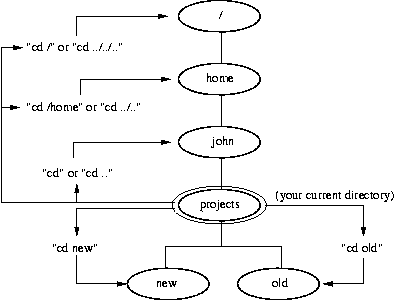
Finally, the figure below illustrates how various cd commands change your current working directory. The example assumes that you are currently located in the directory /home/john/projects, and that your home directory is /home/john.
| Centos 7 intro: | Paths | BasicShell | Search |
| Linux tutorials: | intro1 intro2 wildcard permission pipe vi essential admin net SELinux1 SELinux2 fwall DNS diag Apache1 Apache2 log Mail |
| Caine 10.0: | Essentials | Basic | Search | Acquisition | SysIntro | grep | MBR | GPT | FAT | NTFS | FRMeta | FRTools | Browser | Mock Exam | |
| CPD: | Cygwin | Paths | Files and head/tail | Find and regex | Sort | Log Analysis |
| Kali: | 1a | 1b | 1c | 2 | 3 | 4a | 4b | 5 | 6 | 7a | 8a | 8b | 9 | 10 | |
| Kali 2020-4: | 1a | 1b | 1c | 2 | 3 | 4a | 4b | 5 | 6 | 7 | 8a | 8b | 9 | 10 | |
| Useful: | Quiz | Forums | Privacy Policy | Terms and Conditions |
Linuxzoo created by Gordon Russell.
@ Copyright 2004-2023 Edinburgh Napier University